Most people do not need a complicated prompt engineering system.
They need a simple prompt structure.
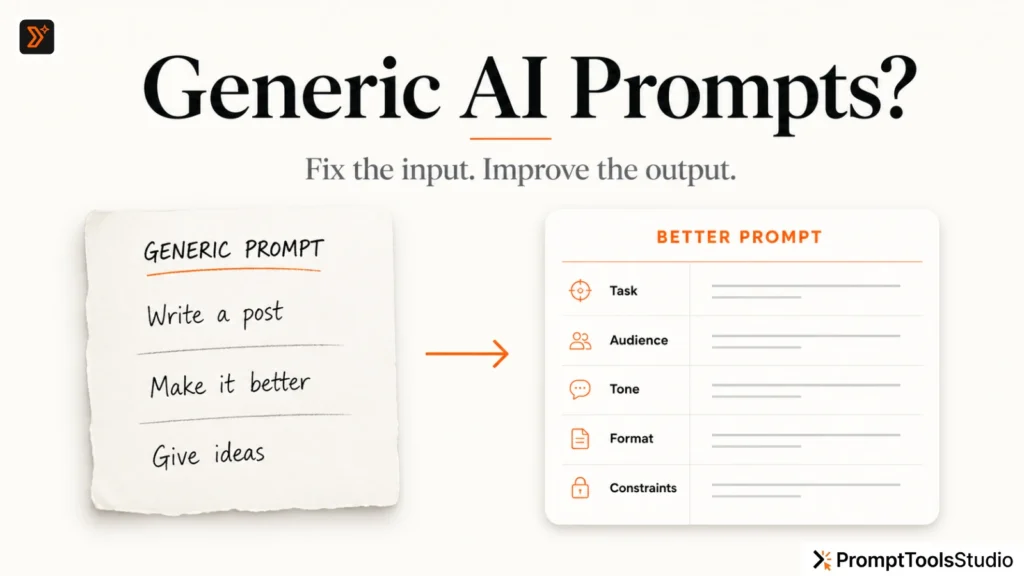
A weak prompt usually looks like this:
Write a good LinkedIn post.
ChatGPT can answer this, but the result will usually sound broad, safe, and generic.
A better prompt gives ChatGPT more direction:
Write a LinkedIn post for a beginner SEO professional.

Topic: why most AI-generated content sounds generic.
Audience: small business owners and marketers.
Goal: explain the problem in a simple way and make people think.
Tone: direct, practical, and slightly sharp.
Format: short paragraphs, no hashtags, no emojis.
Avoid: hype, fake statistics, and robotic wording.
This prompt is not advanced.
It is just structured.
That is the main difference.
A good ChatGPT prompt should tell the model what to do, why it matters, who the answer is for, and how the answer should be delivered.
In this guide, you will learn a simple 7-part ChatGPT prompt structure you can use for writing, content ideas, captions, SEO tasks, image prompts, blog outlines, emails, and more.
What Is a ChatGPT Prompt Structure?
A ChatGPT prompt structure is the way you organize your instruction before asking ChatGPT for an answer.
Instead of writing one vague sentence, you break your prompt into clear parts.
A useful prompt structure usually includes:
- role
- task
- context
- audience
- goal
- format
- constraints
This helps ChatGPT understand the job more clearly.
OpenAI’s own prompting guidance recommends using structure, context, instructions, and constraints to reduce ambiguity and improve the quality of responses. (OpenAI Developers)
You do not need to use all seven parts every time.
But when the output matters, these seven parts can make your prompt much stronger.
Why Prompt Structure Matters
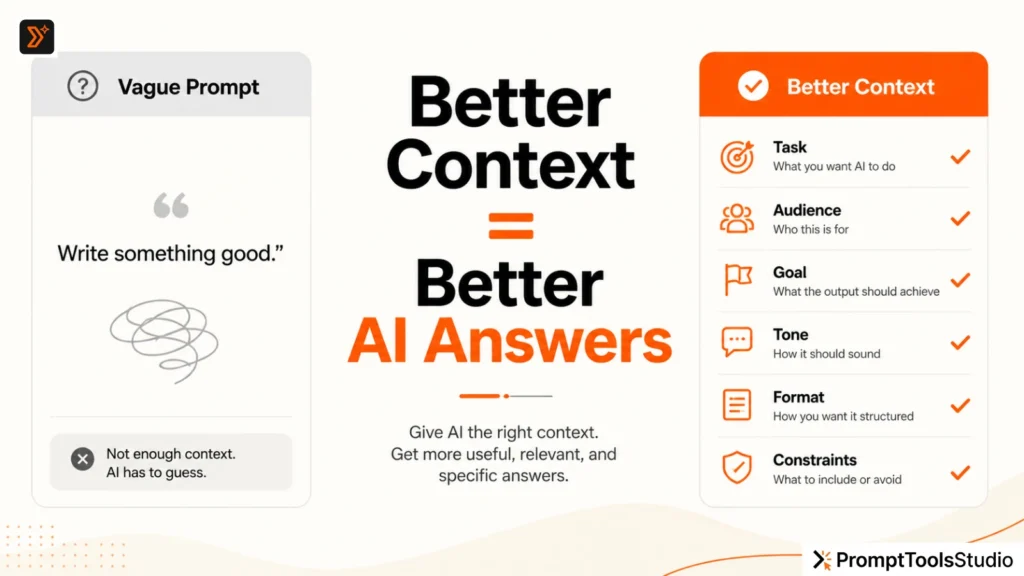
ChatGPT does not read your mind.
It responds based on the information you give.
If you only write:
Give me content ideas.
ChatGPT has to guess:
- What topic?
- What audience?
- What platform?
- What goal?
- What style?
- What content type?
- What should be avoided?
When too many things are missing, the answer becomes average.
A structured prompt removes guesswork.
It gives ChatGPT a clear direction.
That is why structured prompts often produce better answers than random long prompts.
A long prompt can still be bad if it is messy.
A short prompt can work well if it is clear.
Better prompting is not about writing more words.
It is about giving better direction.
Read more: If your outputs sound too basic, first read this guide on why AI prompts sound generic.
The 7-Part ChatGPT Prompt Structure
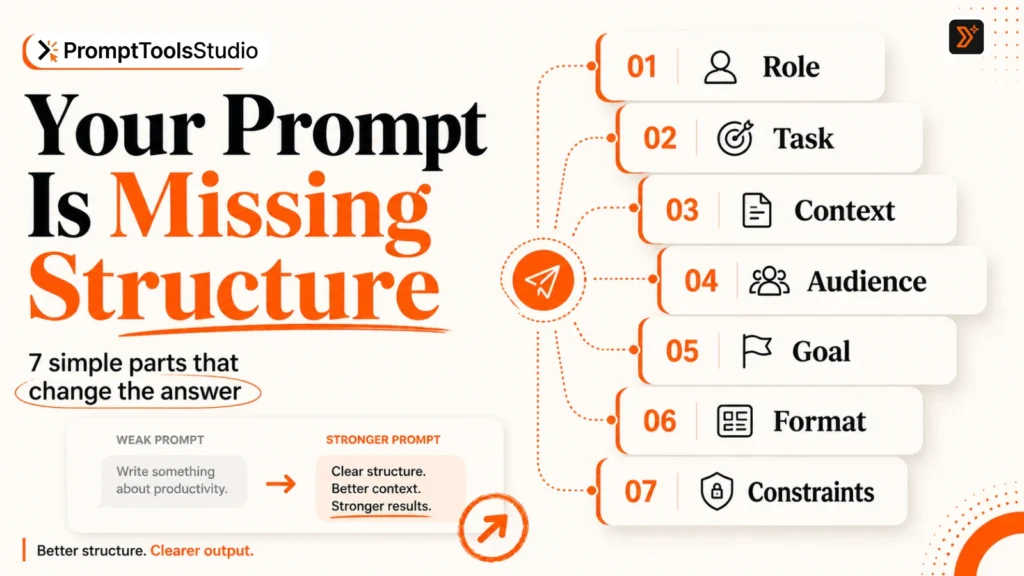
Use this simple structure:
Role + Task + Context + Audience + Goal + Format + Constraints
Here is what each part means.
1. Role: Tell ChatGPT Who to Act As
Role tells ChatGPT what perspective to use.
Examples:
Act as an SEO content strategist.
Act as a beginner-friendly writing coach.
Act as a social media content editor.
Act as a product description copywriter.
Role is useful when you want a certain kind of expertise or judgment.
Weak prompt:
Improve this blog title.
Better prompt:
Act as an SEO editor and improve this blog title for search intent, clarity, and click appeal.
The second prompt gives ChatGPT a clearer job.
But be careful.
Do not use fake or overdramatic roles like:
Act as the world’s greatest genius prompt master.
That does not help much.
Use practical roles that match the task.
Good roles:
- SEO editor
- blog strategist
- writing coach
- email copywriter
- social media content planner
- YouTube title strategist
- AI image prompt expert
- beginner-friendly tutor
If you are not sure what role to use, start with the task first.
2. Task: Tell ChatGPT Exactly What You Want
Task is the action you want ChatGPT to perform.
Examples:
- write
- rewrite
- summarize
- compare
- explain
- improve
- generate
- create
- analyze
- simplify
- convert
- organize
Weak task:
Help me with this.
Better task:
Rewrite this paragraph in simple English without changing the meaning.
Weak task:
Make captions.
Better task:
Create 10 Instagram captions for a handmade candle brand.
Weak task:
Give ideas.
Better task:
Give 15 blog topic ideas for a free AI prompt tools website.
Your task should be specific enough that ChatGPT knows what output to create.
If your task is still rough, use the Prompt Enhancer to improve it before asking ChatGPT.
3. Context: Give the Background Information
Context explains the situation.
It helps ChatGPT understand what the prompt is really about.
For example:
Context:
I run a free AI prompt tools website for creators, students, marketers, and bloggers.
Or:
Context:
This post is for a beginner audience that uses ChatGPT but gets generic answers.
Or:
Context:
This caption is for a premium interior design brand targeting homeowners in Dubai.
Context can include:
- website type
- business type
- product/service
- user problem
- content platform
- industry
- location
- brand tone
- previous issue
- current goal
But do not overload the prompt with unnecessary history.
Bad context:
My business started in 2020, then we changed our logo, then we made a website, then we posted on Instagram, then we tried ads...
Better context:
I run a small SEO service brand that helps premium service businesses improve organic visibility.
Good context is focused.
It gives only the details that affect the output.
Read more: If you want to understand context deeply, read this guide on how to give AI better context.
4. Audience: Tell ChatGPT Who the Output Is For
Audience changes the answer.
The same topic will sound different for:
- students
- founders
- marketers
- beginners
- SEO professionals
- teachers
- bloggers
- small business owners
- content creators
Weak prompt:
Explain prompt engineering.
Better prompt:
Explain prompt engineering to a beginner content creator who uses ChatGPT for captions and blog ideas.
Now ChatGPT knows the reader’s level and use case.
Audience details can include:
- beginner or advanced
- profession
- age group, if relevant
- problem awareness
- platform behavior
- knowledge level
- buying stage
- intent
Example:
Audience:
Small business owners who have heard about AI tools but do not understand how to write useful prompts.
This makes the answer more targeted.
If you are creating prompts for writing tasks, try the Writing Prompt Generator to generate prompts with clearer direction.
5. Goal: Tell ChatGPT What the Output Should Achieve
Goal tells ChatGPT the purpose of the answer.
Without a goal, ChatGPT may create content that looks fine but does not do the right job.
For example:
Write a LinkedIn post about AI prompts.
This is okay, but incomplete.
Better:
Write a LinkedIn post about AI prompts.

Goal:
Make beginners understand that vague prompts create generic answers and encourage them to improve their prompt structure.
Now the output has direction.
Common goals:
- educate the reader
- simplify a topic
- increase clicks
- create curiosity
- explain a mistake
- help someone decide
- improve clarity
- generate ideas
- build trust
- create a usable draft
- compare options
- avoid confusion
For example:
Goal:
Create a YouTube title that makes beginners curious without using clickbait.
If you need title ideas, use the YouTube Title Generator.
6. Format: Tell ChatGPT How You Want the Answer
Format controls how the answer is structured.
If you do not give a format, ChatGPT chooses one by itself.
Sometimes that works.
Sometimes it gives you an output that needs too much editing.
Useful formats:
- short paragraphs
- bullet points
- table
- checklist
- step-by-step guide
- headline options
- caption variations
- email format
- blog outline
- FAQ section
- comparison table
- prompt template
- JSON format
- social media calendar
Weak prompt:
Give me Instagram captions.
Better prompt:
Give me 15 Instagram captions in a table with 3 columns:

1. Caption
2. Tone
3. Best use case
Now the output is more useful.
For social content, you can use the Social Media Caption Generator or browse social media captions.
7. Constraints: Tell ChatGPT What to Include or Avoid
Constraints are rules.
They help ChatGPT stay inside your boundaries.
Examples:
Avoid technical jargon.
Keep the answer under 150 words.
Do not use emojis.
Do not make fake claims.
Avoid hype words like “revolutionary” and “game-changing.”
Use simple English.
Do not mention pricing.
Constraints are very important when the output is for publishing.
They reduce editing time.
They also help avoid risky or low-quality output.
Example:
Write 5 product descriptions for a skincare brand.

Constraints:
Avoid medical claims, exaggerated results, and words like “miracle,” “guaranteed,” and “instant cure.”
This is much better than:
Make it powerful.
Clear rules beat vague style instructions.
A Simple ChatGPT Prompt Template You Can Copy
Use this template when you want a better answer:
Act as a [role].

Task:
[Clearly explain what you want ChatGPT to do.]

Context:
[Give useful background information.]

Audience:
[Explain who the output is for.]

Goal:
[Explain what the output should achieve.]

Format:
[Explain how the answer should be structured.]

Tone:
[Explain how it should sound.]

Constraints:
[Explain what to include, avoid, limit, or protect.]

Before answering, ask me if any important context is missing.
That last line is useful:
Before answering, ask me if any important context is missing.
It stops ChatGPT from guessing too quickly.
It also helps you notice missing details.
Example 1: Blog Prompt Structure
Weak prompt:
Write a blog post about AI prompts.
Better prompt:
Act as an SEO blog editor.

Task:
Write a beginner-friendly blog post about why AI prompts sound generic.

Context:
The article is for PromptToolsStudio.com, a free AI prompt tools and prompt library website.

Audience:
Beginners, creators, students, bloggers, and marketers who use ChatGPT but are unhappy with generic answers.

Goal:
Help readers understand why vague prompts create weak outputs and show them how to improve their prompt structure.

Format:
Use H2 headings, short paragraphs, examples, and a FAQ section.

Tone:
Simple, practical, direct, and helpful.

Constraints:
Avoid fake statistics, hype, and robotic wording.
This prompt gives ChatGPT a much better path.
For more custom prompt creation, use the ChatGPT Prompt Generator.
Example 2: Social Media Prompt Structure
Weak prompt:
Write social media captions.
Better prompt:
Act as a social media content writer.

Task:
Create 10 Instagram captions for a handmade skincare brand.

Context:
The brand sells natural skincare products with a calm, premium, and simple visual style.

Audience:
Women aged 25–40 who prefer gentle skincare and natural ingredients.

Goal:
Build trust and encourage people to visit the product page.

Format:
Give captions in a table with caption, tone, and best use case.

Tone:
Warm, simple, premium, and non-salesy.

Constraints:
Avoid medical claims, exaggerated results, too many emojis, and hype.
This is far more useful.
It tells ChatGPT what to write and what not to write.
Example 3: AI Image Prompt Structure
Weak prompt:
Create an image prompt for my blog.
Better prompt:
Act as an AI image prompt creator.

Task:
Create a feature image prompt for a blog about ChatGPT prompt structure.

Context:
The website is PromptToolsStudio.com, a free AI prompt tools website.

Audience:
Beginners who want to write better AI prompts.

Goal:
Create a premium minimal editorial-style visual that explains prompt structure clearly.

Format:
Give one detailed image prompt.

Tone/Style:
Warm off-white background, near-black text, orange accent, clean typography, no clutter.

Constraints:
No human faces, no fake UI, no stock photos, no 3D graphics, no logos.
If you create visuals often, use the AI Image Prompt Generator or browse AI image prompts.
Example 4: SEO Prompt Structure
Weak prompt:
Give me SEO ideas.
Better prompt:
Act as an SEO content strategist.

Task:
Give me 20 blog topic ideas for a free AI prompt tools website.

Context:
The site has tools for ChatGPT prompts, AI image prompts, writing prompts, captions, blog ideas, and prompt enhancement.

Audience:
Creators, students, bloggers, marketers, and small business owners.

Goal:
Find low-competition practical topics that can bring organic traffic and support existing tool pages.

Format:
Give a table with topic, search intent, target user, internal link opportunity, and content angle.

Tone:
Practical and direct.

Constraints:
Avoid broad topics like “What is AI?” and avoid topics that duplicate existing tool pages.
This prompt is much stronger because it tells ChatGPT the real SEO purpose.
You can also explore the SEO Prompt Generator and SEO prompts for related use cases.
Bad Prompt vs Structured Prompt
Use this section as a simple comparison.
Bad Prompt vs Structured Prompt
Bad Prompt: Write a blog post.
Structured Prompt: Write a beginner-friendly blog post about ChatGPT prompt structure. Audience: creators and marketers. Goal: help them write better prompts. Format: H2 headings, examples, and FAQ. Tone: simple and practical. Avoid hype.
Bad Prompt: Make captions.
Structured Prompt: Create 10 Instagram captions for a handmade candle brand. Audience: gift buyers. Goal: build interest without hard selling. Format: table. Tone: warm and cozy. Keep each caption under 120 characters.
Bad Prompt: Give me ideas.
Structured Prompt: Give me 15 blog ideas for a free AI prompt tools website. Audience: beginners using ChatGPT. Goal: find practical search-friendly topics. Avoid generic AI news topics.
Bad Prompt: Write a title.
Structured Prompt: Write 15 YouTube title ideas for a video about fixing generic ChatGPT answers. Goal: create curiosity without clickbait. Tone: clear, useful, and beginner-friendly.
Common Mistakes to Avoid When Structuring ChatGPT Prompts
A structured prompt helps, but only if the structure is useful.
Avoid these mistakes.
Mistake 1: Adding Too Many Tasks in One Prompt
Bad:
Write a blog post, make captions, create image prompts, do SEO, write meta description, create schema, and make a social media calendar.
This can work sometimes, but it often creates average output.
Better:
First, create the blog outline only.
Then ask for the next step.
One prompt, one main deliverable usually gives better depth.
Mistake 2: Giving Context That Does Not Matter
More information is not always better.
Useful context improves output.
Random context creates noise.
Before adding context, ask:
Does this detail change the answer?
If not, remove it.
Mistake 3: Asking for “Best” Without Defining Best
Bad:
Give me the best caption.
Better:
Give me the best caption for a premium skincare brand where the goal is trust-building, not hard selling.
“Best” needs criteria.
Otherwise ChatGPT has to guess.
Mistake 4: Not Giving Output Format
If you want a table, ask for a table.
If you want short paragraphs, ask for short paragraphs.
If you want 10 options, say 10 options.
Format is not a small detail.
It decides whether the output is usable.
Mistake 5: Not Telling ChatGPT What to Avoid
This is one of the biggest reasons AI output needs heavy editing.
Always add avoid rules when the output will be published.
Examples:
Avoid fake statistics.
Avoid hype.
Avoid robotic phrases.
Avoid jargon.
Avoid long sentences.
Avoid emojis.
Avoid repeated ideas.
These rules save time.
When Should You Use PromptToolsStudio Tools?
Use a prompt tool when you know what you want, but you do not know how to structure the prompt.
For example:
- You have a rough idea.
- Your prompt sounds too vague.
- You want better ChatGPT output.
- You need social media captions.
- You need blog ideas.
- You need writing prompts.
- You need AI image prompts.
- You want ready-to-use examples.
Start with the Prompt Enhancer if your prompt is rough.
Use the ChatGPT Prompt Generator if you want to create a structured prompt from scratch.
Browse ChatGPT Prompts if you want ready-to-use examples.
Explore Prompt Generators if you want tools for different use cases.
Explore Prompt Libraries if you want prompt examples by category.
Final ChatGPT Prompt Structure Checklist
Before asking ChatGPT, check these seven things:
- Did I give ChatGPT a useful role?
- Did I clearly explain the task?
- Did I add relevant context?
- Did I define the audience?
- Did I explain the goal?
- Did I request the right format?
- Did I add constraints?
If the answer is yes, your prompt is already better than most vague prompts.
You do not need to sound technical.
You need to be clear.
Final Thought
A good ChatGPT prompt is not about using fancy words.
It is about giving clear direction.
When you add role, task, context, audience, goal, format, and constraints, ChatGPT does not have to guess as much.
And when ChatGPT guesses less, the answer becomes more useful.
Start simple.
Structure your prompt.
Then improve it based on the output.
That is the practical way to get better answers from ChatGPT.
FAQs
What is the best prompt structure for ChatGPT?
A useful ChatGPT prompt structure includes role, task, context, audience, goal, format, and constraints. You do not need every part for every prompt, but these parts help ChatGPT understand what you want more clearly.
How do I structure a ChatGPT prompt?
Start by telling ChatGPT the role, then explain the task. Add context, audience, goal, output format, tone, and constraints. This reduces guessing and improves the answer.
What should I include in a ChatGPT prompt?
Include what you want ChatGPT to do, who the output is for, why you need it, how it should sound, how it should be formatted, and what should be avoided.
Why does ChatGPT give generic answers?
ChatGPT often gives generic answers when the prompt is too vague. If you do not provide context, audience, goal, or constraints, ChatGPT has to guess.
Is a longer ChatGPT prompt always better?
No. A longer prompt is not always better. A clear prompt is better. Add only the details that affect the output.
Should I give ChatGPT a role?
Yes, a role can help when you want a specific perspective. For example, “Act as an SEO editor” or “Act as a beginner-friendly writing coach.” Use practical roles, not exaggerated ones.
Can I reuse the same ChatGPT prompt structure?
Yes. You can reuse the same structure for blogs, captions, emails, SEO tasks, image prompts, and content ideas. Just change the task, context, audience, goal, format, and constraints.