AI image tools can create beautiful visuals.
But they can also create confusing, generic, or completely wrong images.
You write a prompt like:
Create a premium blog feature image about productivity.
And the result looks boring.
Or too random.
Or too “AI-generated.”
Or nothing like what you imagined.
The problem is not always the image generator.
Many times, the problem is the prompt.
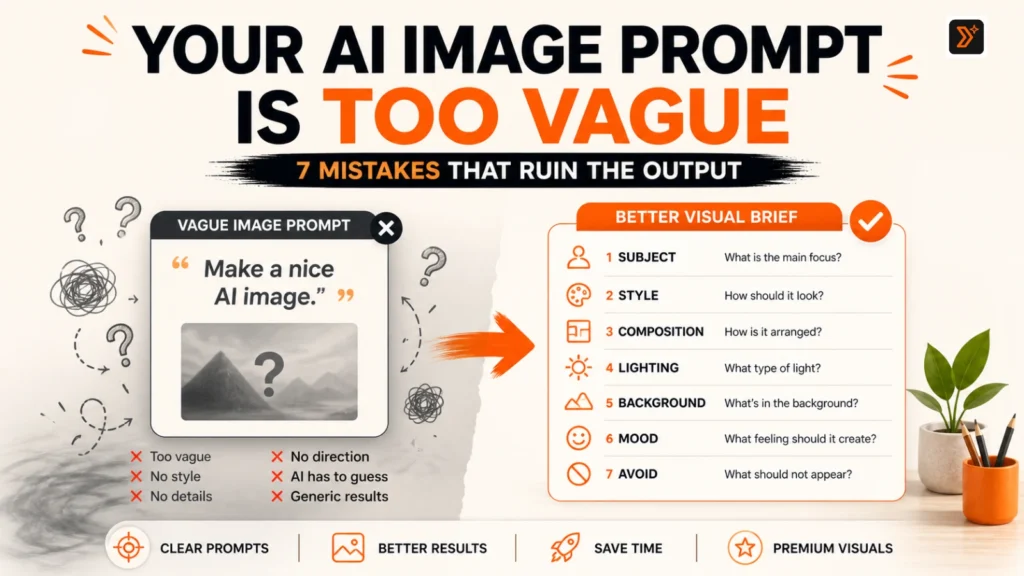
AI image prompts work better when they give clear visual direction. The prompt should describe the subject, style, composition, background, lighting, mood, and purpose of the image.
In simple words:
A good AI image prompt is not just a sentence.
It is a small creative brief.
In this guide, you will learn the most common AI image prompt mistakes and how to fix them.
Why AI Image Prompts Go Wrong
AI image prompts go wrong when the tool has to guess too much.
If you only write:
Create a nice image for my blog.
The AI does not know:
- what the blog is about
- what “nice” means
- what style you want
- what should be shown
- what should be avoided
- what size or layout you need
- whether it is for a blog, Pinterest, social media, or product page
So it fills the gap with common visual patterns.
That is why many AI images look similar.
A better prompt gives more visual control.
For example:
Create a premium minimal editorial-style blog feature image about productivity.

Show a clean desk with a notebook, simple task cards, and one orange focus marker.
Use a warm off-white background, near-black text accents, soft natural light, and clean spacing.
No human faces, no clutter, no 3D graphics, no fake app UI.
Canvas size: 1600 x 900 px.
This prompt gives the AI a clearer direction.
It describes the topic, style, objects, background, lighting, restrictions, and size.
That is why the output has a better chance of matching your idea.
Mistake 1: The Prompt Is Too Vague
The most common AI image prompt mistake is vagueness.
Weak prompt:
Create a beautiful image.
This tells the AI almost nothing.
“Beautiful” can mean anything:
- realistic
- cinematic
- cartoon
- luxury
- colorful
- minimal
- futuristic
- vintage
- dramatic
- soft and calm
Better prompt:
Create a premium minimal editorial-style image about better AI prompts.

Use a warm off-white background, near-black typography, orange accent lines, and a clean split-screen layout showing a vague prompt on one side and a structured prompt on the other.
Now the AI has direction.
It knows the topic, design style, layout, color palette, and visual idea.
Meta AI’s prompt guidance also recommends giving clear details like subject, action, style, background, color, framing, and mood to guide the final image. (Meta AI)
Fix
Before generating an image, define these basics:
- What is the main subject?
- What is the image for?
- What style should it follow?
- What should be visible?
- What should not appear?
- What size or aspect ratio do you need?
Use the AI Image Prompt Generator if you have a rough visual idea but do not know how to turn it into a clear prompt.
Mistake 2: The Subject Is Not Clear
Every AI image prompt needs a clear subject.
The subject is the main thing the image should show.
Weak prompt:
Create an image about content creation.
This is too broad.
Content creation can be shown as:
- a laptop
- a creator
- social media cards
- blog drafts
- camera setup
- content calendar
- writing desk
- AI prompt interface
- abstract idea bubbles
Better prompt:
Create a clean editorial image showing a writer’s desk with three content cards labeled “Idea,” “Draft,” and “Publish.”
Now the subject is clear.
The AI knows what to focus on.
Fix
Use this subject formula:
Create an image showing [main subject] doing/representing [specific idea].
Examples:
Create an image showing a messy prompt turning into a clean structured prompt.
Create an image showing a blog feature image prompt being built from subject, style, lighting, and format.
Create an image showing a product photo setup with a clean background, soft shadow, and minimal props.
For ready visual examples, browse AI image prompts.
Mistake 3: The Style Is Missing
Style tells the AI how the image should look.
Without style, the image generator chooses its own default.
Weak prompt:
Create an image of a laptop and notes.
Better prompt:
Create a premium minimal editorial-style image of a laptop and notes on a warm off-white desk, with soft natural light, clean shadows, and orange accent marks.
The subject is almost the same.
But the second prompt gives style direction.
Useful style words:
- premium minimal editorial
- cinematic realistic
- flat vector illustration
- clean infographic
- soft lifestyle photography
- modern product photography
- magazine cover style
- luxury brand aesthetic
- Pinterest-friendly visual
- bold social media graphic
- warm natural light
- high-contrast editorial layout
Leonardo AI’s guide explains that users often have a clear visual idea, but the model returns something generic or far from the idea when the prompt lacks strong direction. (Leonardo.ai)
Fix
Add a style line:
Style: premium minimal editorial, clean typography, warm off-white background, orange accent, no clutter.
Or:
Style: realistic product photography, soft studio lighting, clean background, subtle shadow, high-detail texture.
If the image is for your blog feature image, you can use AI image prompts for blog feature images for inspiration.
Mistake 4: The Prompt Has No Composition Direction
Composition means how the image is arranged.
Many users describe what they want, but not how it should be placed.
Weak prompt:
Create an image about AI prompts.
Better prompt:
Create a split-screen image.

Left side: a vague prompt card with messy lines and question marks.
Right side: a structured prompt card with clean sections labeled subject, style, lighting, format, and constraints.
Center: a small orange arrow showing improvement.
This gives the AI layout direction.
Composition cues can include:
- split-screen layout
- centered subject
- top-down view
- close-up shot
- wide shot
- hero object in the center
- text on the left, visual on the right
- checklist layout
- before-and-after layout
- layered cards
- diagonal composition
- empty space for headline text
Microsoft Copilot’s image prompting guide also recommends including a clear action, detailed subject, specific style, scene or setting, and additional elements when writing AI art prompts. (Microsoft)
Fix
Add one line for layout:
Composition: split-screen layout with the weak version on the left and improved version on the right.
Or:
Composition: centered object with clean empty space around it for blog headline placement.
For social visuals, explore AI image prompts for social media.
Mistake 5: Lighting, Mood, and Background Are Not Defined
Lighting and background can completely change the image.
Weak prompt:
Create a product photo of a skincare bottle.
This may produce a random bottle, random background, and random lighting.
Better prompt:
Create a realistic product photo of a matte white skincare bottle on a warm beige background.

Use soft studio lighting, subtle shadow, clean premium composition, and minimal natural props like a small leaf and folded towel.
Now the image has a clearer mood.
Useful lighting words:
- soft natural light
- warm studio lighting
- dramatic side lighting
- bright clean lighting
- soft shadows
- golden hour light
- high-key lighting
- low-key cinematic lighting
Useful background words:
- warm off-white background
- clean beige background
- dark editorial background
- blurred office background
- minimal studio setup
- soft gradient background
- natural wooden surface
- premium marble surface
Useful mood words:
- calm
- premium
- playful
- bold
- futuristic
- cozy
- serious
- energetic
- clean
- trustworthy
- creative
Fix
Add this structure:
Lighting: [type of light]
Background: [background style]
Mood: [emotion or brand feeling]
For ecommerce-style visuals, use AI image prompts for product photos.
Mistake 6: The Prompt Tries to Do Too Much
Another common mistake is adding too many ideas into one image prompt.
Weak prompt:
Create an image about AI, productivity, social media, blogging, business growth, SEO, YouTube, Instagram, and content planning.
This is too much.
The AI may create a crowded visual with too many objects.
Better prompt:
Create a clean editorial image about AI-assisted content planning.

Show one central content calendar card with three simple labels: Blog, Social, Video.
Use a minimal background, orange accent lines, and clean spacing.
This is more focused.
One image should usually communicate one main idea.
Fix
Before writing the prompt, ask:
- What is the one main message?
- What should the viewer understand in 2 seconds?
- Which details are unnecessary?
- Can this be simplified?
For example, instead of trying to show “AI marketing strategy,” show:
A clear workflow from idea to prompt to content output.
Simple images are usually more clickable.
Mistake 7: You Do Not Tell AI What to Avoid
AI image prompts should include constraints.
Without constraints, the model may add unwanted elements.
Examples:
No human faces.
No clutter.
No fake app UI.
No distorted text.
No 3D graphics.
No cartoon style.
No logos.
No celebrity likeness.
This is especially important for brand-safe visuals.
For example:
Create a premium minimal blog feature image about AI image prompts.

No human faces, no celebrity likeness, no copyrighted characters, no fake app UI, no 3D icons, no clutter, no distorted text.
This helps keep the output clean and safer to publish.
Fix
Add an “Avoid” line at the end of your prompt:
Avoid: human faces, fake logos, copyrighted characters, clutter, distorted text, and unrealistic hands.
This will not guarantee perfection, but it gives the model better boundaries.
A Better AI Image Prompt Formula
Use this simple formula:
Subject + Purpose + Style + Composition + Background + Lighting + Mood + Size + Avoid
Here is the full template:
Create an image of [main subject].

Purpose:
[Where the image will be used — blog feature image, Pinterest pin, product photo, social post, etc.]

Style:
[Visual style or aesthetic.]

Composition:
[How the image should be arranged.]

Background:
[Background color, setting, or environment.]

Lighting:
[Lighting direction or mood.]

Mood:
[Feeling the image should create.]

Size:
[Canvas size or aspect ratio.]

Avoid:
[Things that should not appear.]
This turns a random sentence into a visual brief.
OpenAI’s image generation prompting guide also explains that prompts for visual assets work better when written like a creative brief, including audience, concept, composition, and boundaries. (OpenAI Developers)
Before and After: Weak AI Image Prompt vs Better Prompt
Weak Prompt vs Better AI Image Prompt
Weak Prompt: Create a blog image about AI prompts.
Better Prompt: Create a premium minimal editorial-style blog feature image about AI image prompts. Show a vague prompt turning into a clear visual brief. Use a warm off-white background, near-black typography, orange accent lines, clean spacing, and a split-screen layout. No human faces, no clutter, no 3D graphics, no fake app UI. Size: 1600 x 900 px.
Weak Prompt: Make a product photo.
Better Prompt: Create a realistic product photo of a matte white skincare bottle on a warm beige background. Use soft studio lighting, subtle shadows, premium minimal styling, and one small natural prop. No hands, no faces, no text errors, no clutter.
Weak Prompt: Create a social media image.
Better Prompt: Create a bold square social media graphic about fixing vague AI prompts. Use large readable headline text, orange accent shapes, minimal background, and a clean before-and-after visual. Size: 1200 x 1200 px. No stock photos, no fake UI, no clutter.
What Every AI Image Prompt Should Include
Before generating your next image, check this:
- Main subject
- Visual purpose
- Style
- Composition
- Background
- Lighting
- Mood
- Color palette
- Aspect ratio or size
- Things to avoid
You do not need to make every prompt long.
But if the image matters, these details matter.
A short prompt gives the AI too much freedom.
A clear prompt gives the AI creative direction.
When Should You Use PromptToolsStudio?
Use PromptToolsStudio when you have an image idea but your prompt is too rough.
For example, you may know:
“I need a feature image for a blog about bad AI prompts.”
But you may not know how to define:
- style
- layout
- lighting
- composition
- background
- constraints
- size
That is where the AI Image Prompt Generator helps.
You can also explore:
- AI image prompts for general ideas
- AI image prompts for blog feature images for blog visuals
- AI image prompts for social media for posts and graphics
- AI image prompts for product photos for ecommerce-style images
- AI image prompts for interior design for room, decor, and space visuals
If your AI image prompt still feels unclear, first read this guide on how to give AI better context.
Final Thought
Bad AI image results are not always random.
Many times, the prompt is missing visual direction.
If you want better images, do not only describe the topic.
Describe the visual.
Tell the AI:
- what to show
- how it should look
- where it will be used
- what mood it should create
- what should not appear
Think like an art director.
Not just a user typing a sentence.
That is how AI image prompts become more useful, more specific, and more publishable.
FAQs
Why do AI image prompts give bad results?
AI image prompts often give bad results because they are too vague. If the prompt does not explain the subject, style, composition, background, lighting, mood, and constraints, the AI has to guess.
How do I write better AI image prompts?
Write AI image prompts like a small creative brief. Include the main subject, purpose, visual style, composition, background, lighting, mood, size, and things to avoid.
Why does AI ignore my image prompt?
AI may ignore parts of your prompt if the prompt has too many details, conflicting instructions, unclear wording, or unrealistic expectations. Keep the prompt focused and structured.
What should every AI image prompt include?
A strong AI image prompt should include subject, style, composition, background, lighting, mood, aspect ratio, and avoid rules.
How do I make AI images look less generic?
Give stronger visual direction. Mention the style, color palette, layout, lighting, mood, and specific objects. Avoid vague words like “nice,” “beautiful,” or “professional” without explaining what they mean.
Should I include image size in an AI image prompt?
Yes. If you need the image for a blog, social media, Pinterest, or product page, mention the size or aspect ratio. For example, blog feature images often use 1600 x 900 px.
Can I use PromptToolsStudio for AI image prompts?
Yes. You can use the AI Image Prompt Generator to turn rough visual ideas into clearer prompts. You can also browse AI image prompt libraries for blog feature images, social media, product photos, and interior design.